Using OpenCV to Detect Face Key Points with C++
This post follows up on Building a Face Detector with OpenCV in C++. In this post we build on that code and detect face key points.
Since we work with a relatively new OpenCV version (4.2.0), you may want to revisit the first post for installation details.
The code is available on GitHub: blog-post-2 branch.
Detecting face key points
After detecting faces, we now want to detect key points.
We use cv::face::FacemarkLBF to find key points inside face rectangles.
Adding the key point detection model file
As with face detection, we need a model file for key points:
To pass the model file location into C++, use the same CMake target_compile_definitions approach from the previous post.
# Introduce preprocessor variables to keep paths of asset files
...
set(KEY_POINT_DETECTION_MODEL
    "${PROJECT_SOURCE_DIR}/assets/lbfmodel.yaml")
...
target_compile_definitions(${PROJECT_NAME}
    PRIVATE KEY_POINT_DETECTION_MODEL="${KEY_POINT_DETECTION_MODEL}")
A class for the key point detector
To keep model initialization and inference in one place, create a KeyPointDetector class.
KeyPointDetector.h
Create include/KeyPointDetector.h.
It contains:
- a constructor for loading the model
detect_key_pointsfor extracting key points from image regions
The return type is a vector of point vectors (std::vector<std::vector<cv::Point2f>>).
Reference file:
KeyPointDetector.cpp
Implement the class in src/KeyPointDetector.cpp.
In the constructor:
- create
cv::face::FacemarkLBF - load the model from
KEY_POINT_DETECTION_MODEL
In detect_key_points:
- transform input to
cv::InputArrayas required by the API - call
fit() - return detected points
Reference file:
Using the key point detector
In main.cpp:
- run the face detector from the previous post
- pass detected rectangles to
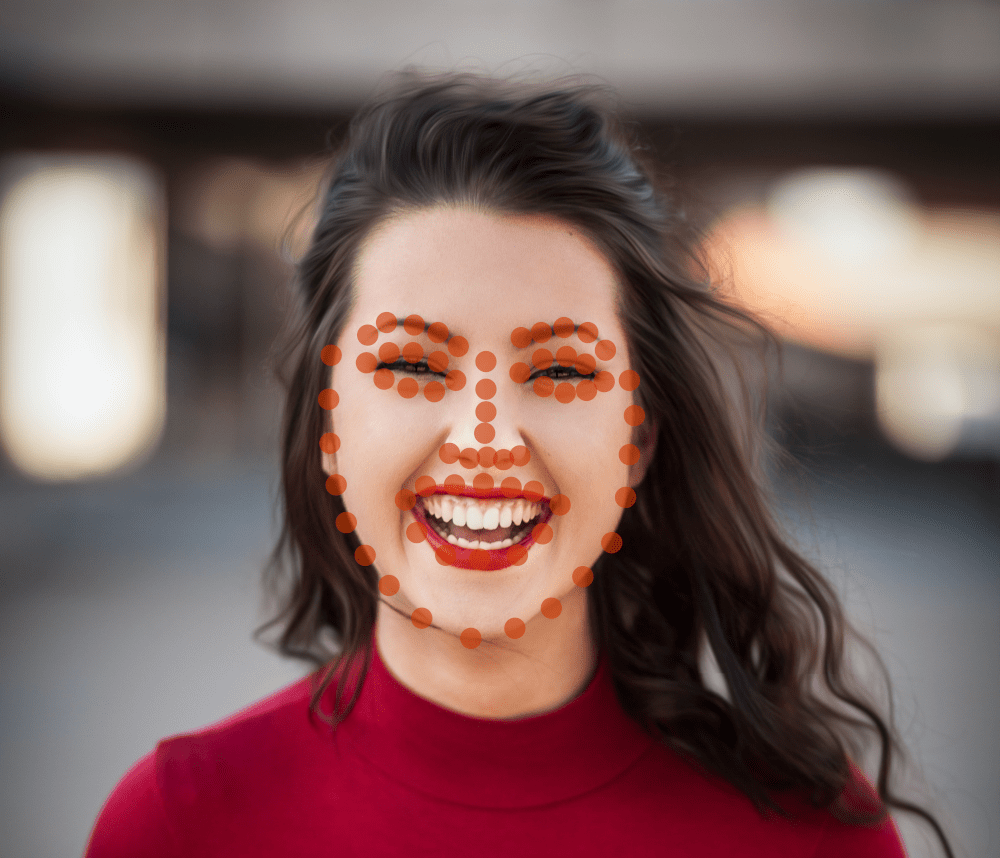
KeyPointDetector - draw detected points instead of face rectangles
Reference file:
You should see a result similar to this:
Conclusion
In this post we used a face detection model to find faces in an image, then extracted face key points using OpenCV.
I hope this helps you build interesting projects. If you run into errors, feel free to reach out.